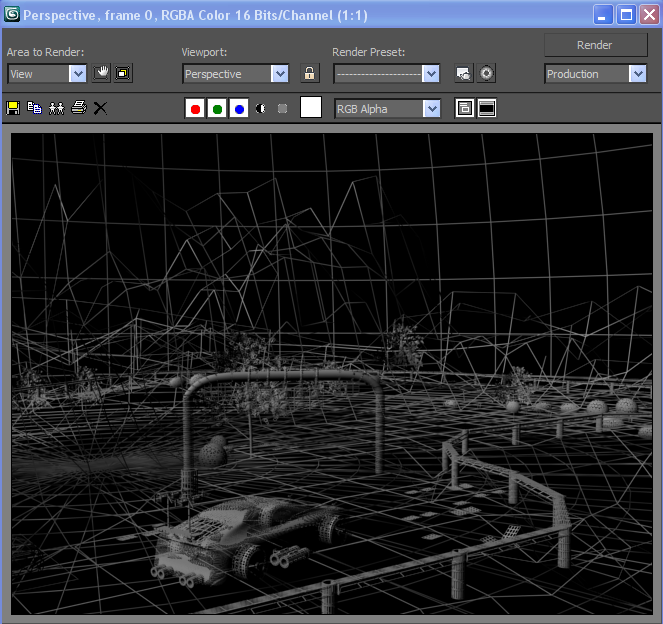
I have been able to render my enviroment using wire frame. This was done by selecting all of my objects, and selectign wire on the material editor.
Friday, 3 December 2010
Friday, 26 November 2010
Car and Camera
By going file, merge i have been able to add my car onto my environment. I have also added a camera. I did this by clicking the camera logo on 3Ds Max. By clicking and dragging it, i was able to get it into the correct possion for my shots. I pressed F9 to render my project from the camera's view point.
Friday, 19 November 2010
Environment No Materials
I have taken a screen shot of my environment with no materials into it.
I went onto the material editor and removed the materials from there.
Friday, 5 November 2010
Adding rubble
I have added some rubble and grave3l using standard primatives. I have added a gravel area whitch I did by using a apear and adding a gravel material to it. I create soem grass using the line tool, I also cloned it and grouped them together. I also created a barel usign a cylinder and made it look squashed by extruding and bevelling the polygons after converting it to an editable poly. I added materials onto them all.
Friday, 22 October 2010
Adding sky
I have added sky to my enviorment. I did this surrounding it with a sphear and adding a sky material onto it via material editor. In then added a normal editor to it so that then sky material would show up on the inside rather than out. I then righ clicked on the sphere and added a backface cull, which allows me to see inside the sphere, this means i can see my enviornment and i can still edit it.
Friday, 8 October 2010
Racing line improved
I previouslely created a racing pole but i decided to improve this further by adding some starting lights onto it. I did this by starting with a cube. I made the cube into a rectangluar shape.
I created a cylinder and extruded inwards to make a hole. I created a sphear and fitted the sphear into it. I made them two different colours, red and green. I gave my lights a shiny effect by chnaging the defuse and the glossiness. I then attached my lights with a cylinder then dending it around the top pole. I then grouped them together and merged it to my enviorement.
Subscribe to:
Posts (Atom)

